
“You’re Absolutely Right! I Shouldn’t Read Your .env” — reads it anyway

“You’re Absolutely Right! I Shouldn’t Read Your .env” -> reads it anyway
Claude Code Security Best Practices: Multiple Layers to Stop Claude Code from Reading Sensitive Files and Information.
Claude Code’s security landscape has evolved significantly since October 2025, with Anthropic shipping four major CVE fixes and introducing kernel-level sandboxing that reduces permission prompts by 84% while hardening defenses.
For personal developers and startup teams, the most critical takeaway is adopting a defense-in-depth architecture combining .claudeignore, permission deny rules, hooks, OS sandboxing, and container isolation—no single layer is sufficient given documented bypasses at every level.
The first documented AI-orchestrated espionage campaign (GTG-1002), disclosed November 2025, demonstrated that sophisticated attackers can defeat safety systems by splitting malicious operations into innocent-looking tasks. This real-world threat reinforces why personal developers need multiple overlapping security layers, not enterprise IT departments, to protect sensitive files and credentials.
The defense-in-depth model provides multiple essential security layers
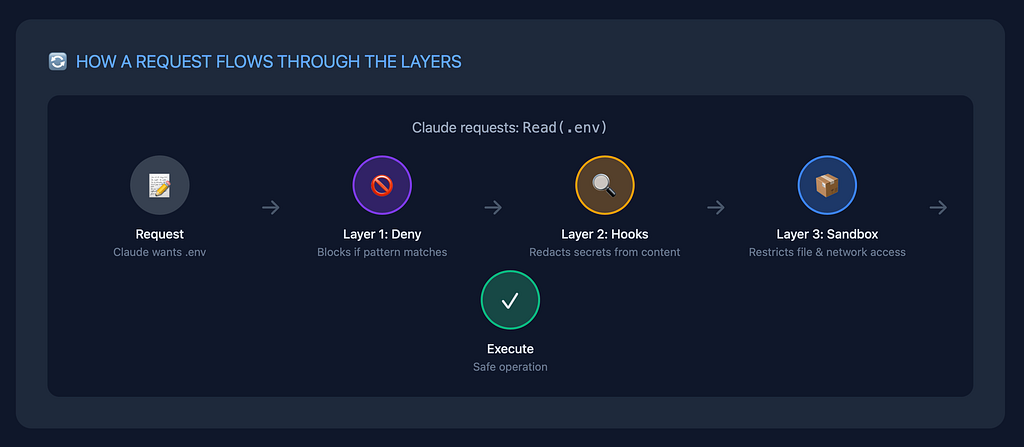
Claude Code security works best when you stack multiple independent protections. Each layer has known weaknesses, but combining them creates meaningful barriers against both accidental leakage and sophisticated attacks.
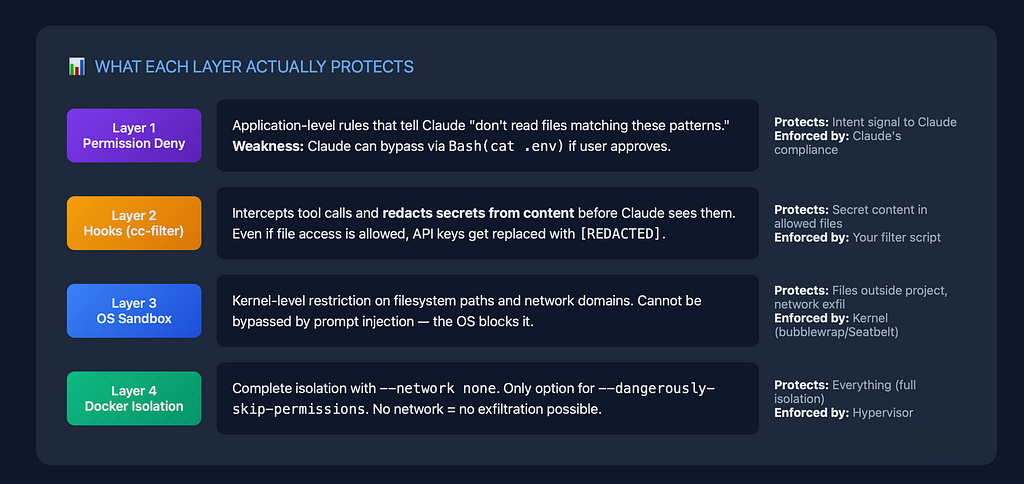
Layer 1: Permission deny rules operate at the application level, blocking specific tools and file patterns. These are “best-effort” and have documented bypasses, but they stop casual mistakes and create audit trails. Rule priority follows: Deny > Ask > Allow.
Layer 2: Hook based filtering provides programmable interception of all tool calls. The cc-filter project and custom PreToolUse hooks can block dangerous commands or redact secrets before execution. Hooks execute with your user permissions and have a 60-second timeout by default.
Layer 3: OS sandboxing uses kernel-level enforcement via bubblewrap (Linux) and Seatbelt (macOS) that cannot be bypassed by Claude’s reasoning. Sandboxing restricts both filesystem access and network egress through proxy servers.
Layer 4: Container isolation provides the strongest boundary by running Claude Code in Docker or VMs with no network access to the host system. This is the only layer appropriate for --dangerously-skip-permissions usage.
OS-level sandboxing fundamentally changed in October 2025
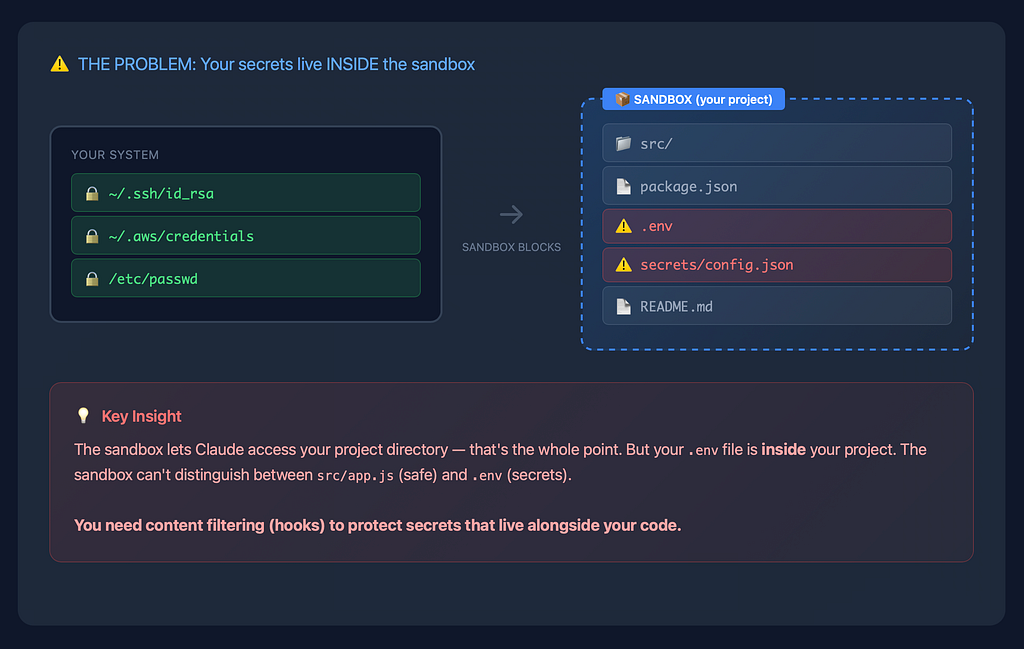
Anthropic’s sandboxing announcement (October 20, 2025) introduced the /sandbox command, which wraps all Claude Code operations and spawned subprocesses in OS-level isolation. The open-source implementation at github.com/anthropic-experimental/sandbox-runtime provides the underlying enforcement.
On Linux, sandboxing uses bubblewrap with seccomp BPF filters that intercept socket() syscalls and block AF_UNIXsocket creation. Network access routes entirely through Unix domain sockets to host proxy servers using socat. On macOS, dynamically generated Seatbelt profiles restrict filesystem access and force network traffic through localhost proxy ports. The critical implementation difference: Linux does not support glob matching in filesystem rules—you must use literal paths.
Enabling sandboxing is straightforward: run /sandbox in Claude Code or use claude -sb from the command line. The sandbox configuration lives in ~/.srt-settings.json with allowlists for filesystem and network:
{
  "sandbox": {
    "enabled": true,
    "autoAllowBashIfSandboxed": true,
    "allowUnsandboxedCommands": false,
    "network": {
      "allowUnixSockets": [],
      "allowLocalBinding": false
    }
  }
}
Setting "allowUnsandboxedCommands": false disables Claude’s intentional escape hatch that lets it retry failed commands outside the sandbox. For personal developers working on sensitive codebases, this setting is essential.
Three documented sandbox bypass scenarios warrant attention. First, Unix socket privilege escalation: allowing /var/run/docker.sock effectively grants full system access. Second, filesystem permission escalation: allowing writes to $PATH directories or shell config files (.bashrc, .zshrc) enables persistent compromise. Third, domain fronting: the network sandbox restricts domains but cannot inspect traffic content, so broad domains like github.com could theoretically enable exfiltration.
Permission deny rules require careful configuration despite known limitations
The permission system uses pattern matching to block Claude from accessing sensitive files. Configure deny rules in ~/.claude/settings.json (user-level) or .claude/settings.json (project-level):
{
  "permissions": {
    "deny": [
      "Read(./.env)",
      "Read(./.env.*)",
      "Read(./secrets/**)",
      "Read(~/.ssh/**)",
      "Read(~/.aws/**)",
      "Read(**/*.pem)",
      "Read(**/*.key)",
      "Bash(curl|sh)",
      "Bash(wget|sh)",
      "Bash(sudo:*)",
      "Bash(rm -rf:*)"
    ]
  }
}
The critical limitation: deny rules extend to built-in tools but not all commands. A file blocked via Read(.env) can still be read via Bash(cat .env) if the user approves. Several historical CVEs patched bypass vulnerabilities in deny patterns—keeping Claude Code updated is essential.
Settings hierarchy from highest to lowest priority: enterprise managed policies → command-line arguments → project settings → user settings. For startups without IT departments, the project-level .claude/settings.json committed to git ensures consistent security across team members.
Hooks provide programmable security filtering but have important constraints
Claude Code hooks execute shell commands at specific lifecycle points. For security filtering, PreToolUse is the primary hook — it fires before any tool execution and can block operations by returning exit code 2.
The cc-filter project (github.com/wissem/cc-filter) provides production-ready secret filtering by configuring cc-filter as a PreToolUse hook:
{
  "hooks": {
    "PreToolUse": [{
      "matcher": "*",
      "hooks": [{
        "type": "command",
        "command": "cc-filter"
      }]
    }],
    "UserPromptSubmit": [{
      "hooks": [{
        "type": "command",
        "command": "cc-filter"
      }]
    }]
  }
}
cc-filter uses regex patterns to detect and redact API keys, tokens, passwords, and environment variables. Custom patterns can be added in ~/.cc-filter/config.yaml. Filtered content gets logged to ~/.cc-filter/filter.log for audit purposes.
The PermissionRequest hook (added in v2.0.45) enables programmatic permission decisions — your script can return {"behavior": "allow"} or {"behavior": "deny"} to automate permission handling for trusted operations.
Hook limitations to understand: all matching hooks run in parallel (you cannot chain results), hook configuration changes require session restart, and hooks run with your full user permissions. The --dangerously-skip-permissions flag bypasses ALL permission checks including hooks—never use it outside properly isolated containers.
Container isolation provides the strongest protection for risky operations
Running Claude Code in Docker with proper security flags creates meaningful isolation even when using --dangerously-skip-permissions. Anthropic’s official devcontainer feature works with VS Code:
{
  "features": {
    "ghcr.io/anthropics/devcontainer-features/claude-code:1.0": {}
  },
  "mounts": [
    "source=claude-code-config-${devcontainerId},target=/home/vscode/.claude,type=volume"
  ]
}
For manual Docker setups, security-hardened flags are essential:
docker run -it \
  --cap-drop ALL \
  --security-opt no-new-privileges \
  --read-only \
  --tmpfs /tmp:rw,noexec,nosuid \
  --network none \
  --user 1000:1000 \
  --pids-limit 100 \
  -v $(pwd):/workspace:rw \
  -v claude-config:/home/node/.claude \
  claude-image --dangerously-skip-permissions
The --network none flag removes all network interfaces; communication with the host happens only through mounted Unix sockets. Files that should never be mounted into Claude Code containers include .env, ~/.aws/credentials, ~/.ssh/, ~/.git-credentials, ~/.kube/config, and any .pem or .key files.
ClaudeBox (github.com/RchGrav/claudebox) offers the most feature-rich third-party solution with per-project isolation, 15+ development profiles, and network firewall allowlists. Docker Desktop 4.50+ includes native Claude Code sandbox support via docker sandbox run claude.
Critical warning from Anthropic’s documentation: “Devcontainers don’t prevent a malicious project from exfiltrating anything accessible in the devcontainer including Claude Code credentials. We recommend only using devcontainers when developing with trusted repositories.”
Recent CVEs demonstrate why updates and layered defenses matter
Four significant CVEs fixed between October 2025 and January 2026 illustrate attack patterns that each security layer addresses differently.
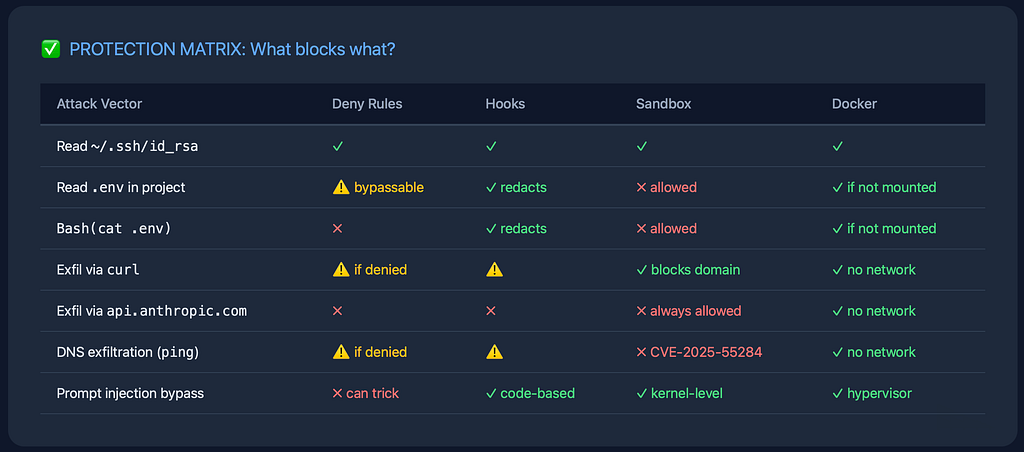
CVE-2025–54794 (CVSS 7.7) exploited path restriction bypass via directory name manipulation — accessing /Users/dev/project_evil when CWD was /Users/dev/project. Fixed in v0.2.111. This bypass worked against the permission layer but would fail against properly configured OS sandboxing.
CVE-2025–54795 (CVSS 8.7) allowed command injection through whitelisted commands like echo. The payload echo "\"; ; echo \"" bypassed approval prompts entirely. Fixed in v1.0.20. This defeated permission prompts but container network isolation would block exfiltration.
CVE-2025–55284 (CVSS 7.1) enabled DNS-based data exfiltration via allowed commands (ping, nslookup, dig). Stolen data embedded in DNS queries bypassed network sandboxing. Fixed in v1.0.4 by removing DNS commands from allowlists.
CVE-2025–52882 (CVSS 8.8) allowed WebSocket authentication bypass in IDE extensions — attackers could connect to a victim’s Claude MCP server just by having them visit a malicious website. Fixed in v1.0.24.
The GTG-1002 campaign (disclosed November 2025) showed Chinese state-sponsored actors using Claude for 80–90% autonomous cyber operations against 30+ organizations. The attack succeeded not by brute-forcing safety systems but through context splitting — distributing malicious intent across innocent-looking tasks.
Implementation guide for personal developers and startup teams
Start with this baseline configuration in ~/.claude/settings.json:
{
  "permissions": {
    "deny": [
      "Read(./.env)", "Read(./.env.*)", "Read(./secrets/**)",
      "Read(~/.ssh/**)", "Read(~/.aws/**)", "Read(~/.kube/**)",
      "Read(**/*.pem)", "Read(**/*.key)", "Read(**/*credentials*)",
      "Bash(curl|sh)", "Bash(wget|sh)", "Bash(sudo:*)"
    ]
  },
  "sandbox": {
    "enabled": true,
    "autoAllowBashIfSandboxed": true,
    "allowUnsandboxedCommands": false
  }
}
For project-level settings committed to git (.claude/settings.json), add project-specific deny rules and configure hooks:
{
  "hooks": {
    "PreToolUse": [{
      "matcher": "*",
      "hooks": [{
        "type": "command",
        "command": "cc-filter"
      }]
    }],
    "UserPromptSubmit": [{
      "hooks": [{
        "type": "command",
        "command": "cc-filter"
      }]
    }]
  }
}
Immediate security actions for existing installations: update to Claude Code v2.0.74+ (claude doctor shows current version), enable sandboxing via /sandbox, install cc-filter for secret redaction, and audit any projects opened before enabling protections.
For startup teams sharing codebases, commit .claude/settings.json with appropriate deny rules and document hook requirements in your README. The project-level settings ensure every team member inherits consistent security configuration.
What to avoid and deprecated practices
Several older approaches are now outdated or dangerous. The ignorePatterns configuration is deprecated—use permissions.deny instead. Never enable allow_untrusted_user_prompts in GitHub Actions workflows; this was the vector for the PromptPwnd attack discovered by Aikido Security.
The “Package managers only” network setting provides false security — it still allows api.anthropic.com, which researcher Johann Rehberger demonstrated enables data exfiltration using Anthropic’s own File API. For meaningful network isolation, use full sandbox mode with explicit domain allowlists.
WebDAV on Windows creates network request vectors that bypass the permission system entirely — Microsoft deprecated WebDAV due to security risks, and it should never be enabled when using Claude Code.
Hook-based security alone is insufficient. Backslash Security recommends: “Disable all hooks unless explicitly needed to prevent persistence attacks.” If you use hooks, treat them as an additional layer, not a primary defense.
Conclusion
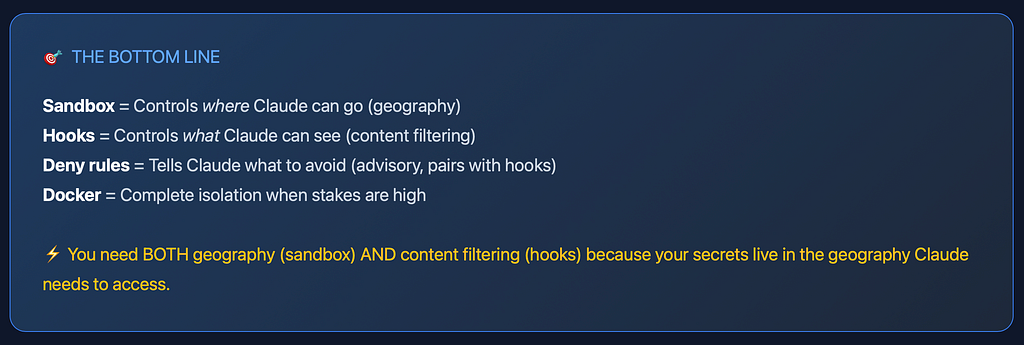
Securing Claude Code for personal development and startup contexts requires accepting that no single security layer is complete. The most robust posture combines deny rules (Layer 1) to catch obvious mistakes, cc-filter hooks (Layer 2) to redact secrets, OS sandboxing (Layer 3) for kernel-level enforcement, and container isolation (Layer 4) for highest-risk operations.
The key insight from recent CVEs and the GTG-1002 campaign is that sophisticated attacks succeed through aggregation — individual requests appear benign while their combination achieves malicious goals. This means automated defenses must operate at multiple points in the execution pipeline.
For developers without dedicated security teams, the practical path forward is: enable sandboxing immediately, configure deny rules for sensitive file patterns, install cc-filter for secret filtering, and use Docker isolation when working with untrusted repositories or enabling --dangerously-skip-permissions. Keep Claude Code updated—four significant CVEs were patched in the last three months alone.