
Enum-driven SwiftUI TextField Part 3: Two Stage Validation System (Advanced scenarios)
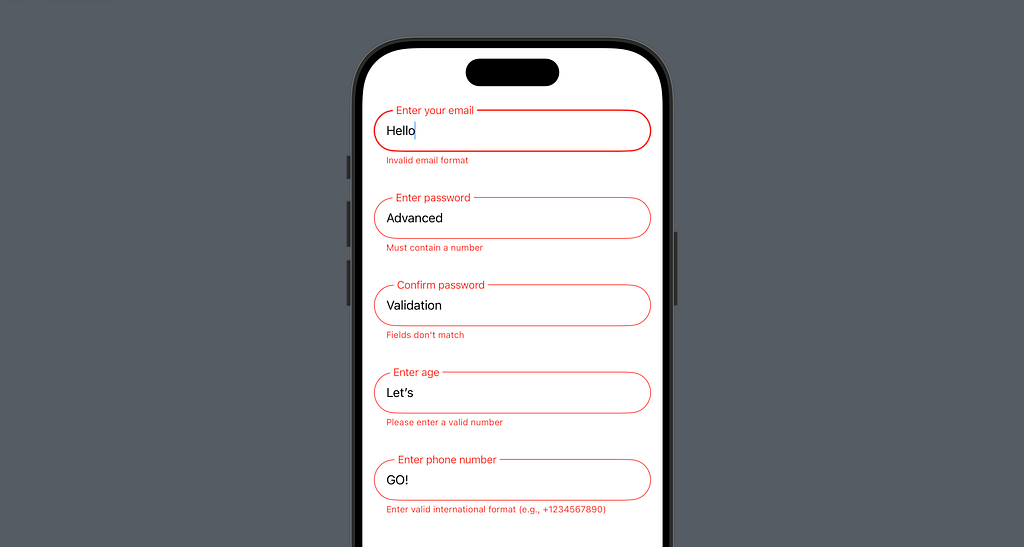
Hello & welcome back to our series on building a production-ready SwiftUI TextField! In Parts 1 and 2, we established our enum-driven foundation and basic validation system. Now, we’ll take it further and extend our input field with powerful validation patterns that solve real-world challenges we will face as we develop our apps.
What We’ll Build
- Password strength validation with configurable requirements
- Pattern-based validation for common formats
- Cross-field validation (e.g., confirm password)
- Number range validation
- Common validation presets (phone, ZIP codes, etc.)
Enhanced Validation Type
Let’s start by extending our InputValidationType enum with more powerful validation patterns. starting with password validation:
extension InputValidationType {
    // Password validation with configurable requirements
    static func password(
        minLength: Int = 8,
        requiresUppercase: Bool = true,
        requiresNumber: Bool = true,
        requiresSpecial: Bool = true
    ) -> Self {
        .custom { text in
            // Validate minimum length
            guard text.count >= minLength else {
                return .invalid("Must be at least \(minLength) characters")
            }

            // Validate uppercase if required
            if requiresUppercase && !text.contains(where: \.isUppercase) {
                return .invalid("Must contain an uppercase letter")
            }

            // Validate number if required
            if requiresNumber && !text.contains(where: \.isNumber) {
                return .invalid("Must contain a number")
            }

            // Validate special character if required
            if requiresSpecial {
                let specialChars = "!@#$%^&*()_+-=[]{}|;:,.<>?"
                if !text.contains(where: { specialChars.contains($0) }) {
                    return .invalid("Must contain a special character")
                }
            }

            return .valid
        }
    }
}
This password validation function is highly configurable, allowing you to specify exactly what requirements you need for your use case. By using static functions that return Self, we maintain our enum-driven approach while adding powerful functionality.
Pattern-Based Validation (personal favorite🔥)
For many validation scenarios, we need to match text against specific patterns. Let’s add a reusable pattern validator:
extension InputValidationType {
    static func pattern(_ pattern: String, message: String) -> Self {
        .custom { text in
            let predicate = NSPredicate(format: "SELF MATCHES %@", pattern)
            guard predicate.evaluate(with: text) else {
                return .invalid(message)
            }
            return .valid
        }
    }
}
This simple & powerful addition allows us to create custom pattern validations with clear error messages. We can use this to build common validation presets:
extension InputValidationType {
    static var internationalPhone: Self {
        .pattern("^\\+[1-9]\\d{1,14}$",
                message: "Enter valid international format (e.g., +1234567890)")
    }

    static func zipCode(country: String = "US") -> Self {
        switch country {
        case "US":
            return .pattern("^\\d{5}(-\\d{4})?$",
                          message: "Enter valid ZIP code (e.g., 12345 or 12345-6789)")
        default:
            return .pattern("^\\d{5}$", message: "Enter valid postal code")
        }
    }
}
Cross-Field Validation
One common requirement is validating fields against each other, like confirming passwords. Here’s how we handle that:
extension InputValidationType {
    static func matching(_ otherText: String, message: String = "Fields don't match") -> Self {
        .custom { text in
            guard text == otherText else {
                return .invalid(message)
            }
            return .valid
        }
    }
}
Number Range Validation
For numeric inputs that need to be within specific ranges:
extension InputValidationType {
    static func numberRange(
        min: Int,
        max: Int,
        message: String? = nil
    ) -> Self {
        .custom { text in
            guard let number = Int(text) else {
                return .invalid("Please enter a valid number")
            }
            guard (min...max).contains(number) else {
                return .invalid(message ?? "Value must be between \(min) and \(max)")
            }
            return .valid
        }
    }
}
Practical Real-World Usage
struct RegistrationExample: View {
    @State private var email = ""
    @State private var password = ""
    @State private var confirmPassword = ""
    @State private var age = ""

    var body: some View {
        VStack(spacing: 24) {
            // Email with validation
            InputField(
                config: .init(
                    placeholder: "Email",
                    validations: [.required, .email]
                ),
                text: $email
            )

            // Password with strong requirements
            InputField(
                config: .init(
                    placeholder: "Password",
                    validations: [
                        .required,
                        .password(
                            minLength: 8,
                            requiresUppercase: true,
                            requiresNumber: true,
                            requiresSpecial: true
                        )
                    ]
                ),
                text: $password
            )

            // Confirm password with matching validation
            InputField(
                config: .init(
                    placeholder: "Confirm Password",
                    validations: [
                        .required,
                        .matching(password)
                    ]
                ),
                text: $confirmPassword
            )

            // Age with range validation
            InputField(
                config: .init(
                    placeholder: "Age",
                    validations: [
                        .required,
                        .numberRange(min: 13, max: 120)
                    ]
                ),
                text: $age
            )
        }
        .padding()
    }
}
From the example above we can see the key takeaways:
- Enum-driven validation provides a clean, type-safe way to handle complex validation patterns
- Static functions returning Self allow for powerful, configurable validation rules
- Pattern-based validation enables easy creation of common validation presets
- Clear error messages help users understand what’s wrong and how to fix it
Good validation isn’t just about preventing bad input — it’s about guiding users to provide the right input through clear feedback and intuitive interactions.
and with this, our validation system is complete! it serves as a solid foundation for building production-ready input fields in SwiftUI applications. Whether you’re handling user registration, form submissions, or data entry, these patterns can be easily adapted to meet your specific needs while maintaining clean, maintainable code.