
Enum-driven SwiftUI TextField Part 2: Two Stage Validation System (The foundation)
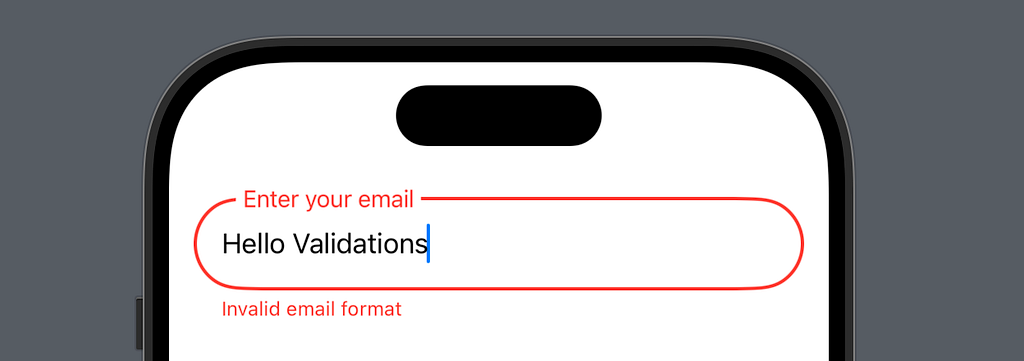
In Part 1, we built a solid foundation for our input field using enum-driven state management. Now, let’s add a professional-grade validation system that’s:
- Type-safe with compile-time checks
- User-friendly with real-time feedback
- Easy to extend with custom rules
Core Concept
Instead of simple valid/invalid states, we’ll implement a two-stage validation system:
- Real-time validation while typing (more relaxed)
- Complete validation on blur (more strict)
This approach gives users immediate feedback while preventing frustration from premature error messages.
Key Components
Validation Types
enum InputValidationType {
    case required
    case email
    case phone
    case custom((String) -> ValidationResult)
}

enum ValidationResult {
    case valid
    case invalid(String)
}
Why enums? Again, we get compile-time safety and clear, impossible-to-misuse validation rules.
Configuring the Configurator!
struct InputConfig {
    let placeholder: String
    let validations: [InputValidationType]

    init(
        placeholder: String,
        validations: [InputValidationType] = []
    ) {
        self.placeholder = placeholder
        self.validations = validations
    }
}
Two-Stage Validation Implementation
extension InputField {
    func updateState() {
        if isFocused {
            validateWhileTyping()  // Stage 1: Real-time
        } else {
            validateOnBlur()       // Stage 2: Complete (when unfocused)
        }
    }
}
Stage 1: Real-time Validation
func validateWhileTyping() {
    // Skip empty validation while typing
    guard !text.isEmpty else {
        inputState = .focused(.empty)
        return
    }

    // Run format validations only
    for validation in config.validations {
        switch validation {
        case .email:
            if !isValidEmail(text) {
                inputState = .focused(.invalid("Invalid email format"))
                return
            }
        case .phone:
            if !isValidPhone(text) {
                inputState = .focused(.invalid("Invalid phone number"))
                return
            }
        case .required:
            continue // Skip required check while typing
        case let .custom(validator):
            switch validator(text) {
                case .valid: break
                case let .invalid(message):
                    inputState = .focused(.invalid(message))
                    return
            }
        }
    }

    inputState = .focused(.valid)
}
Stage 2: Complete Validation
func validateOnBlur() {
    // 1. Check required field first
    if config.validations.contains(where: {
        if case .required = $0 { return true }
        return false
    }) && text.isEmpty {
        inputState = .inactive(.invalid("This field is required"))
        return
    }

    // 2. Skip other validations if empty
    guard !text.isEmpty else {
        inputState = .idle
        return
    }

    // 3. Run all validations
    for validation in config.validations {
        switch validation {
        case .required: continue // Already checked
        case .email:
            if !isValidEmail(text) {
                inputState = .inactive(.invalid("Invalid email format"))
                return
            }
        case .phone:
            if !isValidPhone(text) {
                inputState = .inactive(.invalid("Invalid phone number"))
                return
            }
        case let .custom(validator):
            switch validator(text) {
            case .valid: break
            case let .invalid(message):
                inputState = .inactive(.invalid(message))
                return
            }
        }
    }

    inputState = .inactive(.valid)
}
Usage Example
struct ContentView: View {
    @State private var email = ""
    @State private var phone = ""
    @State private var name = ""

    var body: some View {
        VStack(spacing: 24) {
            // Basic required field
            InputField(
                config: .init(
                    placeholder: "Name",
                    validations: [.required]
                ),
                text: $name
            )

            // Email with multiple validations
            InputField(
                config: .init(
                    placeholder: "Email",
                    validations: [.required, .email]
                ),
                text: $email
            )

            // Phone with custom error message
            InputField(
                config: .init(
                    placeholder: "Phone",
                    validations: [
                        .required,
                        .phone,
                        .custom { text in
                            guard text.hasPrefix("+") else {
                                return .invalid("Number must start with '+'")
                            }
                            return .valid
                        }
                    ]
                ),
                text: $phone
            )
        }
        .padding()
    }
}
Notes on Implementation
Why Two Stages?
The two-stage validation system serves multiple purposes:
User Experience (UX)
- Immediate format feedback while typing
- Delayed required field validation
- Progressive disclosure of errors
Performance
- Validates only what’s necessary when necessary
- Prevents validation thrashing
- Optimizes for common use cases
Developer Experience (DX)
- Clear separation of validation stages
- Type-safe validation rules
- Easy to extend and maintain
Why Return Early?
Our validation functions use early returns for several reasons:
- Shows only one error at a time, avoiding overwhelming the user with error messages
- Prevents unnecessary validation checks
- Makes validation order explicit and controllable
- Improves performance by skipping unnecessary validations
Hello @ViewBuilder!
As our input field grows more complex with validation, accessories, and different states, using @ViewBuilder becomes crucial for several key reasons:
View Composition Efficiency
Instead of creating all subviews at once:
var body: some View {
    VStack {
        leadingIcon      // Always created
        textField        // Always created
        trailingIcon     // Always created
        errorMessage     // Always created
    }
}
@ViewBuilder allows conditional composition:
@ViewBuilder
func makeErrorMessage() -> some View {
    if case let .invalid(message) = inputState.validity {
        Text(message)  // Only created when needed
    }
}
Memory Management
- Views marked with @ViewBuilder are constructed lazily
- SwiftUI can better optimize memory usage
- Prevents unnecessary view allocations
State-Dependent Views Our input field has multiple states:
enum InputState {
    case idle
    case focused(InputValidity)
    case inactive(InputValidity)
}
@ViewBuilder lets us efficiently construct different views for each state without creating unused views.
Performance Impact
//Before (Creates all views) 🐌
var errorMessage: some View {
    Group {
        if case let .invalid(message) = inputState.validity {
            Text(message)
        }
    }
}

//After (Creates only needed views) ✌🏼
@ViewBuilder
func makeErrorMessage() -> some View {
    if case let .invalid(message) = inputState.validity {
        Text(message)
    }
}
The enum-driven approach combined with @ViewBuilder gives us both type safety and view construction efficiency.
Standard Validators
// will be expanded more in is part 2-2 of the article!
extension InputField {
    func isValidEmail(_ email: String) -> Bool {
        let emailRegex = "[A-Z0-9a-z._%+-]+@[A-Za-z0-9.-]+\\.[A-Za-z]{2,64}"
        return NSPredicate(format: "SELF MATCHES %@", emailRegex)
            .evaluate(with: email)
    }

    func isValidPhone(_ phone: String) -> Bool {
        let phoneRegex = "^\\d{10}$"
        return NSPredicate(format: "SELF MATCHES %@", phoneRegex)
            .evaluate(with: phone)
    }
}
Conclusion
The complete implementation is available in the code snippets below. The validation system integrates seamlessly with our existing enum-driven input field from Part 1, maintaining the same principles of type safety and clean architecture.
This concludes Part 2 of our series. In Part 3 we’ll explore:
- Password strength rules
- Cross-field validation (confirm password)
- Custom validation rules
- Error message management
- Format preservation
- Validation groups
- Each feature will maintain our enum-driven approach while adding powerful new capabilities to our input field.
Complete code
//
//
// Enum-Driven TextField by MANGO byte
//
//

import SwiftUI

struct MainView: View {
 @State private var name = ""
 @State private var email = ""

 var body: some View {
  ScrollView {
   VStack(spacing: 32) {
    InputField(config: .init(placeholder: "Enter your email", validations: [
     .required,
     .email
    ]),
         text: $email)

    InputField(config: .init(placeholder: "Enter your name"),
         text: $name)

   }
  }
  .contentMargins(16)
 }
}

#Preview {
 MainView()
}

//Input field and state
enum InputState: Equatable {
 case idle
 case focused(InputValidity)
 case inactive(InputValidity)

 enum InputValidity: Equatable {
  case empty
  case valid
  case invalid(String)
 }

 var validity: InputValidity {
  switch self {
  case .idle: return .empty
  case .focused(let validity): return validity
  case .inactive(let validity): return validity
  }
 }
}

// UI properties driven on input state
extension InputState {
 var tintColor: Color {
  switch self {
  case .idle: return .secondary
  case let .focused(validity):
   switch validity {
   case .empty, .valid: return .blue
   case .invalid: return .red
   }
  case let .inactive(validity):
   switch validity {
   case .empty: return .secondary
   case .valid: return .blue
   case .invalid: return .red
   }
  }
 }
}

// Input field validation
enum InputValidationType {
 case required
 case email
 case phone
 case custom((String) -> ValidationResult)
}

enum ValidationResult {
 case valid
 case invalid(String)
}

// The Configurator!
struct InputConfig {
 let placeholder: String
 let validations: [InputValidationType]

 init(
  placeholder: String,
  validations: [InputValidationType] = []
 ) {
  self.placeholder = placeholder
  self.validations = validations
 }
}

// Main View
struct InputField: View {
 private let config: InputConfig
 @Binding private(set) var text: String
 @FocusState private var isFocused: Bool
 @State private var inputState: InputState = .idle

 init(config: InputConfig, text: Binding<String>) {
  self.config = config
  self._text = text
 }

 var body: some View {
  VStack(alignment: .leading, spacing: 0) {
   ZStack(alignment: .leading) {
    makeTextField()
    makeFloatingLabel()
   }

   makeErrorMessage()
  }
  .frame(height: hasError ? 85 : 55)
  .animation(.spring(duration: 0.2), value: inputState)
  .onChange(of: text) { _, _ in updateState() }
  .onChange(of: isFocused) { _, _ in updateState() }
 }
}

// + Sub views
extension InputField {
 @ViewBuilder
 func makeTextField() -> some View {
  TextField("", text: $text)
   .focused($isFocused)
   .padding(.horizontal)
   .frame(height: 55)
   .background(
    Capsule()
     .stroke(inputState.tintColor,
       lineWidth: isFocused ? 2 : 1)
   )
 }

 @ViewBuilder
 func makeFloatingLabel() -> some View {
  Text(config.placeholder)
   .padding(.horizontal, 5)
   .background(.background)
   .foregroundStyle(inputState.tintColor)
   .padding(.leading)
   .offset(y: labelOffset)
   .scaleEffect(labelScale)
   .onTapGesture {
    isFocused = true
   }
 }

 @ViewBuilder
 func makeErrorMessage() -> some View {
  Group {
   if case let .invalid(message) = inputState.validity {
    Text(message)
     .foregroundStyle(.red)
     .font(.caption)
     .padding(.leading)
     .padding(.top, 4)
   }
  }
 }
}

// + State management
extension InputField {
 func updateState() {
  if isFocused {
   validateWhileTyping()  // Stage 1: Real-time validation while typing
  } else {
   validateOnBlur()       // Stage 2: Complete validation when field loses focus
  }
 }

 var labelOffset: CGFloat {
  switch inputState {
  case .idle where text.isEmpty: return 0
  default: return -32
  }
 }

 var labelScale: CGFloat {
  switch inputState {
  case .idle where text.isEmpty: return 1
  default: return 0.85
  }
 }
}

// + Validation
extension InputField {
 var hasError: Bool {
  switch inputState {
  case .focused(.invalid), .inactive(.invalid):
   return true
  default:
   return false
  }
 }

 func validateWhileTyping() {
  // Skip empty validation while typing
  guard !text.isEmpty else {
   inputState = .focused(.empty)
   return
  }

  for validation in config.validations {
   switch validation {
   case .email:
    if !isValidEmail(text) {
     inputState = .focused(.invalid("Invalid email format"))
     return
    }
   case .phone:
    if !isValidPhone(text) {
     inputState = .focused(.invalid("Invalid phone number"))
     return
    }
   case .required:
    continue // Skip required check while typing
   case let .custom(validator):
    switch validator(text) {
    case .valid: break
    case let .invalid(message):
     inputState = .focused(.invalid(message))
     return
    }
   }
  }

  inputState = .focused(.valid)
 }

 func validateOnBlur() {
  // Check required field first
  if config.validations.contains(where: {
   if case .required = $0 { return true }
   return false
  }) && text.isEmpty {
   inputState = .inactive(.invalid("This field is required"))
   return
  }

  // Skip other validations if empty
  guard !text.isEmpty else {
   inputState = .idle
   return
  }

  // Run all validations
  for validation in config.validations {
   switch validation {
   case .required: continue // Already checked, continue
   case .email:
    if !isValidEmail(text) {
     inputState = .inactive(.invalid("Invalid email format"))
     return
    }
   case .phone:
    if !isValidPhone(text) {
     inputState = .inactive(.invalid("Invalid phone number"))
     return
    }
   case let .custom(validator):
    switch validator(text) {
    case .valid: break
    case let .invalid(message):
     inputState = .inactive(.invalid(message))
     return
    }
   }
  }

  inputState = .inactive(.valid)
 }

 func isValidEmail(_ email: String) -> Bool {
  let emailRegex = "[A-Z0-9a-z._%+-]+@[A-Za-z0-9.-]+\\.[A-Za-z]{2,64}"
  return NSPredicate(format: "SELF MATCHES %@", emailRegex)
   .evaluate(with: email)
 }

 func isValidPhone(_ phone: String) -> Bool {
  let phoneRegex = "^\\d{10}$"
  return NSPredicate(format: "SELF MATCHES %@", phoneRegex)
   .evaluate(with: phone)
 }
}