
Claude Code Sensitive Information Redaction (with interactive playground!)
Extending Wissem’s cc-filter Security Hook from Binary Blocking to Intelligent Redaction in Claude Code and What We Learned About Claude Code’s API Gaps Along the Way
Claude Code’s hook-based security filtering took a significant step forward with our merged PR to Wissem Riahi’s cc-filter project extending protection types from 3 to 5, introducing smart file redaction that lets Claude read code while automatically masking secrets, and adding prompt-level blocking with clipboard-assisted recovery. The contribution also lead is to a more important discovery: what couldn’t be built due to gaps in Claude Code’s hook API.
For developers who found cc-filter’s binary blocking too aggressive i.e. denying entire files when only a few lines contained secrets, the most critical addition is the /tmp/claude/redacted/ cache system. Claude can now read config.swift with API keys replaced by ***FILTERED***, preserving code context while protecting credentials. For developers relying on UserPromptSubmit hooks, the most critical fix is proper exit code 2 handling that actually erases blocked prompts from conversation context.
Interactive Playground Available!
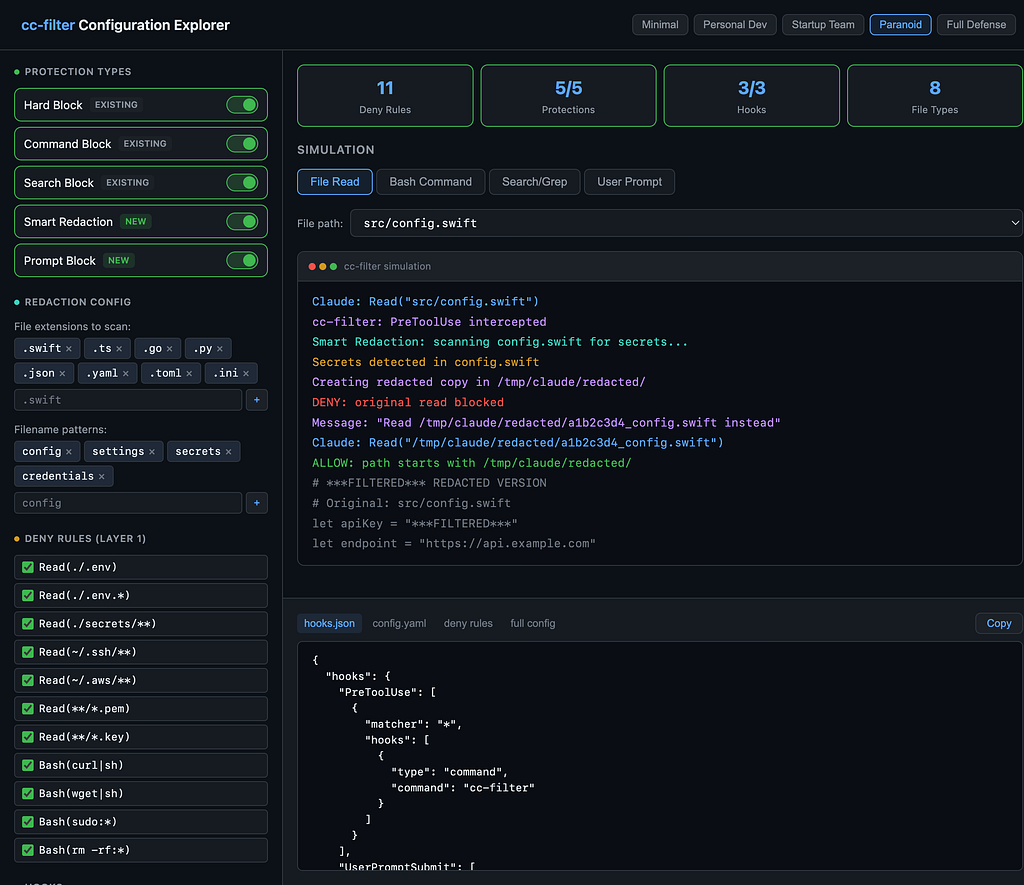
We built an interactive cc-filter Configuration Explorer to accompany this article. Toggle protection types, configure deny rules, adjust redaction settings, and watch a live simulation of how cc-filter handles file reads, bash commands, search patterns, and user prompts and snap all controls to cohesive configurations you can copy directly into your project. all directly in the browser!
The defense-in-depth model make cc-filter as the programmable interception layer
For readers coming in cold, our previous article outlined a four-layer security architecture for Claude Code. Each layer operates independently with different enforcement guarantees:
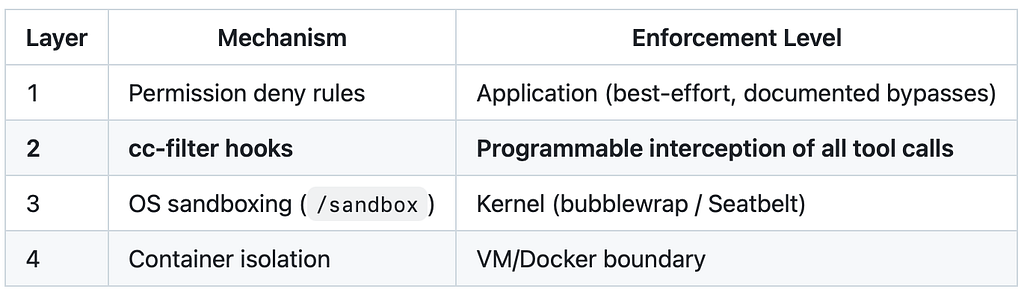
Layer 2 is where cc-filter operates. Hooks fire before tool execution and can allow, deny, or (in theory) modify the input before Claude processes it. That “in theory” part is where things get interesting.
The sandbox (Layer 3) lets Claude access your project directory, that’s the whole point. But your .env file is inside your project. The sandbox can't distinguish between src/app.js (safe) and .env (secrets). You need content filtering (Layer 2) to protect secrets that live alongside your code.
cc-filter architecture made smart redaction straightforward to implement
Before diving into the additions, the existing foundation warrants acknowledgment. cc-filter already handled the hard problems: intercepting hook events, parsing JSON input/output, managing three-layer configuration (Default → User → Project), and applying regex-based secret detection through a clean rules engine.
The critical architectural decision: separating hook routing from action handling. This meant adding new behaviors without touching the event processing pipeline.
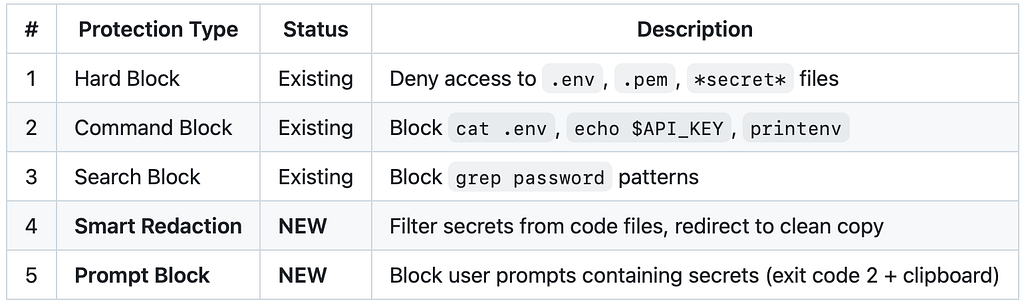
What Wissem built provided five capabilities out of the box:
- a hook processor architecture with clean separation between event routing and action handling.
- a rules engine with flexible regex-based pattern matching and configurable replacements.
- file blocking using pattern-based denial for .env, .pem, and similar sensitive files.
- command blocking with regex matching for dangerous bash commands like cat .env or echo $API_KEY.
- search blocking to prevent grep patterns that expose secrets.
The PR extends cc-filter from 3 protection types to 5
Claude Code’s hook API promises three capabilities but only two work reliably:
Claude Code’s hook system gives PreToolUse hooks three capabilities on paper:

We discovered the updatedInput limitation while implementing smart file redaction. The plan was elegant: when Claude reads a file containing secrets, cc-filter would create a redacted copy in /tmp/claude/redacted/, then use updatedInput to silently swap the file path. Claude would read the clean version without ever knowing a redirect happened.
The response cc-filter generates for a seamless redirect looks correct:
{
  "hookSpecificOutput": {
    "hookEventName": "PreToolUse",
    "permissionDecision": "allow",
    "updatedInput": {
      "file_path": "/tmp/claude/redacted/a1b2c3d4_config.swift"
    }
  }
}
Claude Code accepts this response, returns no error BUT then reads the original file anyway. The updatedInput field is parsed, acknowledged, and completely ignored for the Read tool's file_path parameter. Tested January 2026 against the latest Claude Code version at the time (2.0.70).
⚠️ Whether this is a bug or an intentional restriction is unclear. The documentation does not mention this limitation. The hook API schema accepts the field. The system just doesn’t act on it. The allowWithRedirect function is preserved in cc-filter's codebase for future use if Anthropic fixes this behavior.
UserPromptSubmit hooks can block prompts but cannot filter their content
The second gap is in the UserPromptSubmit hook. When a user types a prompt containing secrets. say, pasting a config file with API keys, the hook system provides exactly three options:
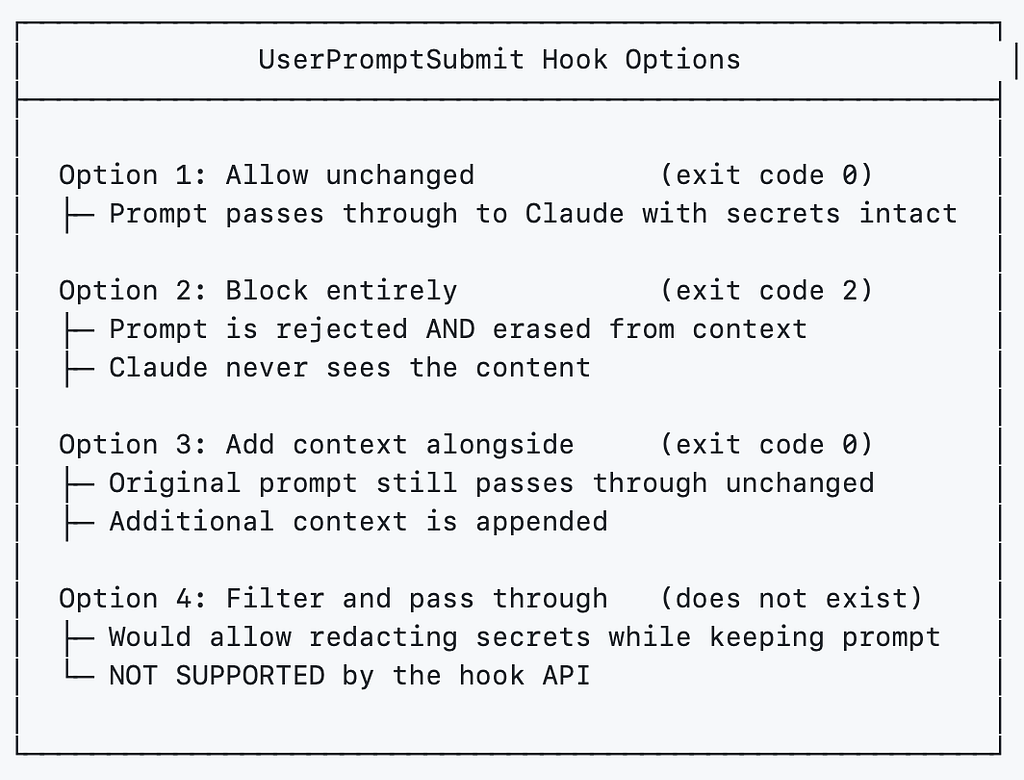
The critical limitation: there is no way to intercept a user prompt, strip the secrets, and pass through the sanitized version. The hook cannot modify prompt content. You either let everything through or block everything.
This means cc-filter cannot silently protect users who paste API keys into their prompts. The best it can do is catch the mistake and make recovery less painful, which is exactly what the new implementation does:
Exit code 2 block prompts AND erases them from conversation context.
The distinction between exit code 1 and exit code 2 is critical and under-documented:
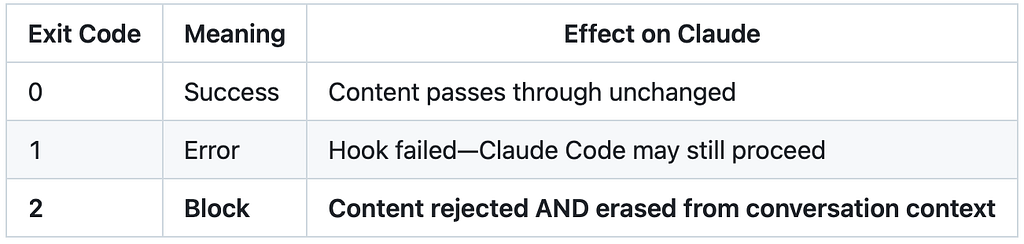
Exit code 2 reject the prompt AND erases it. Claude never sees the content that was blocked. This is the only exit code appropriate for sensitive content in user input: if the prompt were blocked but still visible in context, the secrets would already be exposed to the model.
The original cc-filter wasn’t returning exit code 2 for UserPromptSubmit blocks. The hook detected secrets and returned an error, but without the correct exit code, the blocking behavior was unreliable. Fixing this required changes to both main.go and the hook processor.
In main.go, error propagation now triggers the context-erasing exit code:
// Exit code 2 for blocking + context erasure
if result.Error != nil {
    fmt.Fprintln(os.Stderr, result.Error.Error())
    os.Exit(2) // blocks UserPromptSubmit, erases prompt
}
The processUserPromptSubmit function uses existing FilterContent method so no new regex logic needed, just application in a new context:
func (c *ClaudeHookProcessor) processUserPromptSubmit(input map[string]interface{}) (string, error) {
    prompt, _ := input["prompt"].(string)
    result := c.rules.FilterContent(prompt)

    if result.Filtered {
        // Build detected patterns list
        var patternsDisplay string
        for _, name := range result.MatchedPatterns {
            patternsDisplay += fmt.Sprintf("  • %s\n", name)
        }

        // Auto-copy redacted content to clipboard
        clipboardStatus := "✓ Copied to clipboard - paste to continue"
        if err := copyToClipboard(result.Content); err != nil {
            clipboardStatus = "⚠ Could not copy to clipboard (pbcopy not available)"
        }

        return "", fmt.Errorf(
            "⛔ BLOCKED: Sensitive content detected\n\n"+
                "Detected patterns:\n%s\n"+
                "Your message (redacted):\n%s\n%s\n%s\n\n%s",
            patternsDisplay, separator, result.Content, separator, clipboardStatus)
    }

    return "{}", nil
}
Note that MatchedPatterns field was added to FilterResult to track which specific regex patterns triggered the block. This gives users actionable information: seeing openai_keys rather than a generic "sensitive content detected" message so they know exactly which part of their prompt caused the rejection.
Smart file redaction uses deny-then-redirect because the seamless approach doesn’t work
Since updatedInput doesn't work for Read tool redirects, cc-filter now uses a two-step workaround: deny the original read request, then tell Claude where to find the redacted version.
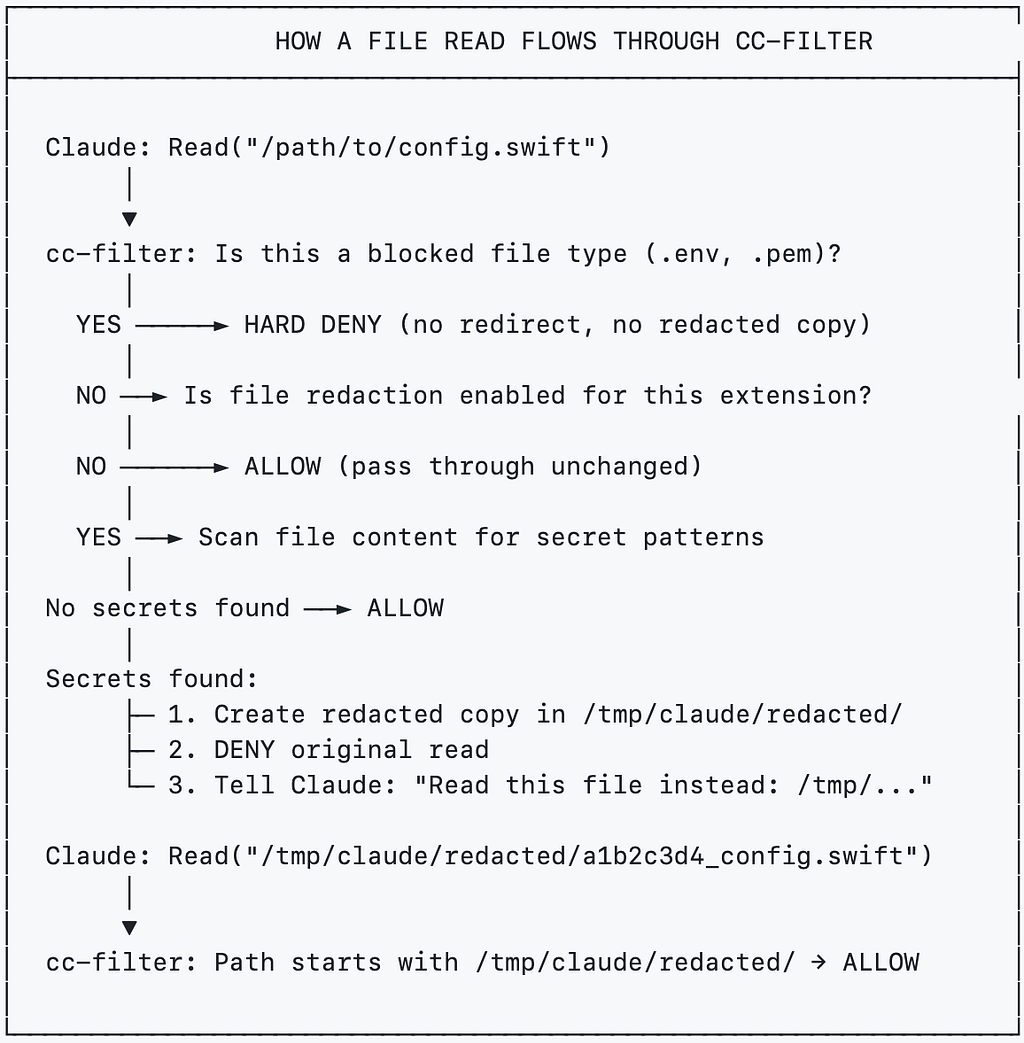
The implementation extends handleReadTool in claude.go:
func (c *ClaudeHookProcessor) handleReadTool(toolInput map[string]interface{}) (string, error) {
    filePath, _ := toolInput["file_path"].(string)

    // Allow reads from the redacted cache
    if strings.HasPrefix(filePath, redactCacheDir) {
        return c.allowTool()
    }

    // Hard block for sensitive file types (.env, .pem, etc.)
    if shouldBlock, reason := c.rules.ShouldBlockFile(filePath); shouldBlock {
        return c.denyTool(reason)
    }

    // Smart redaction for configured code file extensions
    if c.shouldRedactFile(filePath) {
        redactedPath, wasRedacted, err := c.createRedactedFile(filePath)
        if err == nil && wasRedacted {
            return c.denyWithRedirect(filePath, redactedPath)
        }
    }

    return c.allowTool()
}
The createRedactedFile function also use existing FilterContent method:
func (c *ClaudeHookProcessor) createRedactedFile(originalPath string) (string, bool, error) {
    content, err := os.ReadFile(originalPath)
    if err != nil {
        return "", false, err
    }

    // Uses existing rules engine - no new regex logic needed
    filtered := c.rules.FilterContent(string(content))
    if !filtered.Filtered {
        return "", false, nil // No secrets found, no redaction needed
    }

    hash := sha256.Sum256([]byte(originalPath))
    cacheName := fmt.Sprintf("%x_%s", hash[:8], filepath.Base(originalPath))
    cachePath := filepath.Join(redactCacheDir, cacheName)

    header := fmt.Sprintf(
        "# ***FILTERED*** REDACTED VERSION - Some sensitive values have been masked\n"+
        "# Original: %s\n\n", originalPath)

    os.WriteFile(cachePath, []byte(header+filtered.Content), 0644)
    return cachePath, true, nil
}
The redaction cache uses SHA-256 hashing of the original path to generate unique filenames. This prevents collisions when multiple files share the same basename (e.g., multiple config.js files in different directories) while keeping the original filename visible for Claude's context.
This approach is objectively worse than a seamless updatedInput redirect. Claude sees the deny message, has to make a second read request, and the conversation now contains a visible "SECRETS DETECTED" warning. But it works reliably and until Anthropic fixes updatedInput, it's the best available approach.
⚠️ Critical Trade-off: Redacted Files Cannot Be Edited by Claude
Claude Code requires that a file has been read before it can be edited. Since Claude reads the redacted copy at /tmp/claude/redacted/, not the original file, any subsequent attempt to edit the original will fail, Claude never "read" it from the permission system's perspective. This creates a read-only workflow for redacted files: Claude can analyze, understand, and reason about the code, but cannot modify it directly. In practice this means either editing the redacted temp file or applying changes to the original file yourself based on Claude's suggestions. This is the most significant UX cost of the deny-then-redirect pattern and another reason why fixing updatedInput matters as a seamless redirects would preserve Claude's ability to edit the original file.
File redaction requires explicit opt-in
A critical design decision: smart redaction is disabled by default. Empty configuration means no file scanning, no breaking changes for existing installations.
Enable it via ~/.cc-filter/config.yaml or project-level config.yaml:
redact_files:
  # File extensions to scan for secrets
  extensions:
    - ".swift"
    - ".ts"
    - ".go"
    - ".py"
    - ".json"
    - ".yaml"

  # Filename patterns to scan (matches if filename contains pattern)
  filename_patterns:
    - "config"
    - "settings"
    - "secrets"
The configuration merges across three layers with clear priority:
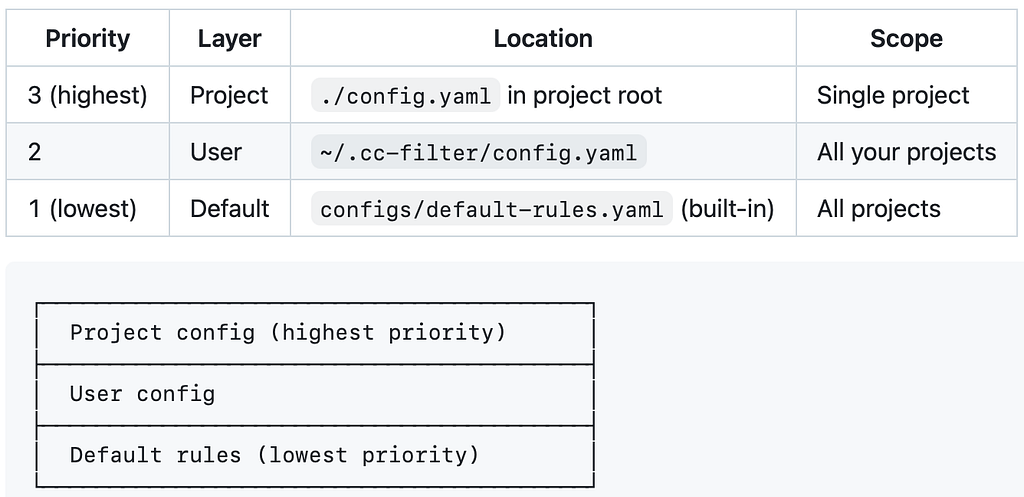
If redact_files has no extensions and no filename_patterns, the feature is completely disabled. Existing installations continue working identically after updating to new version of cc-filter.
Since the hook API cannot filter prompts (only block them), the implementation focuses on making the block experience as smooth as possible. When cc-filter detects secrets in a user prompt, three things happen:
- the prompt is blocked with exit code 2 and erased from context
- the specific patterns that triggered the block are identified and displayed.
- the redacted content is auto-copied to clipboard for immediate re-submission.
⛔ BLOCKED: Sensitive content detected

Detected patterns:
  • openai_keys

Your message (redacted):
────────────────────────────────────────
Here's my config: API_KEY=***************************************************
────────────────────────────────────────

✓ Copied to clipboard - paste to continue
The clipboard copy is the key UX improvement. Before this change, getting blocked meant retyping your entire prompt without the secret. Now you paste the already-redacted version and continue immediately.
SessionEnd cleanup prevents redacted file accumulation across sessions
Redacted files accumulate in /tmp/claude/redacted/ during a session. The new SessionEnd hook handles cleanup automatically:
func (c *ClaudeHookProcessor) processSessionEnd(input map[string]interface{}) (string, error) {
    os.RemoveAll(redactCacheDir)
    return "{}", nil
}
Without this hook, /tmp/claude/redacted/ would accumulate stale files across sessions. The cleanup runs automatically when Claude Code terminates normally.
The complete hooks configuration now requires three event types:
{
  "hooks": {
    "PreToolUse": [{
      "matcher": "*",
      "hooks": [{ "type": "command", "command": "cc-filter" }]
    }],
    "UserPromptSubmit": [{
      "hooks": [{ "type": "command", "command": "cc-filter" }]
    }],
    "SessionEnd": [{
      "hooks": [{ "type": "command", "command": "cc-filter" }]
    }]
  }
}
Hook explanations:
- PreToolUse: Intercepts tool calls (Read, Bash, Grep, Glob) to block or redact sensitive file access
- UserPromptSubmit: Scans user prompts for secrets before they reach Claude (blocks with exit code 2)
- SessionEnd: Cleans up temporary redacted files when the session ends
Two targeted fixes from Anthropic would eliminate the need for these workarounds

The first fix is likely simpler because updatedInput already exists in the API schema and is accepted without error. Making it actually modify the Read tool's file path would immediately enable transparent content filtering for every hook-based security tool, not just cc-filter.
The second fix is harder architecturally but more impactful. If UserPromptSubmit hooks could return modified prompt content, tools like cc-filter could strip secrets in-flight without interrupting the user's workflow. The block-then-paste pattern works, but it's friction that shouldn't be necessary.
Summary: what changed across components
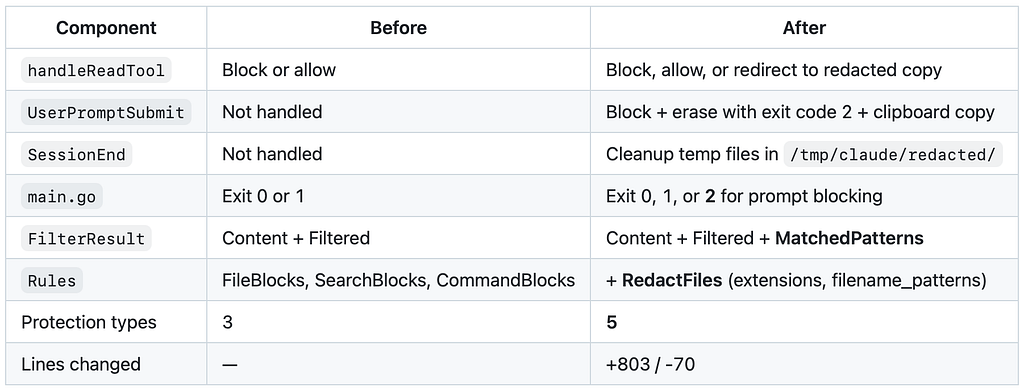
The practical path forward combines deny rules with intelligent hook filtering
For developers wanting the full protection suite, the complete configuration requires three pieces.
- Hook configuration in ~/.claude/settings.json or .claude/settings.json (the JSON block above).
- Redaction config in ~/.cc-filter/config.yaml with your project-specific extensions and filename patterns.
- Deny rules in ~/.claude/settings.json, alongside hooks:
{
  "permissions": {
    "deny": [
      "Read(./.env)", "Read(./.env.*)", "Read(./secrets/**)",
      "Read(~/.ssh/**)", "Read(~/.aws/**)", "Read(**/*.pem)",
      "Bash(curl|sh)", "Bash(wget|sh)", "Bash(sudo:*)"
    ]
  }
}
The deny rules (Layer 1) and cc-filter hooks (Layer 2) are complementary. Deny rules catch the obvious cases and provide a fast path. cc-filter handles the nuanced cases such as secrets embedded in code files, dangerous commands, patterns in search queries, and accidental prompt exposure.
Conclusion
The key insight from contributing to cc-filter is that Claude Code’s hook API has a meaningful gap between specification and implementation and that gap forces every hook-based security tool into workarounds that degrade user experience. The updatedInput mechanism exists in the schema but doesn't function for Read tool redirects. Prompt hooks can block but cannot filter. These limitations force real architectural compromises.
The workarounds are functional: Smart file redaction via deny+redirect catches secrets in code files. Prompt blocking with clipboard copy minimizes friction when users paste sensitive content. Configurable redaction keeps the tool non-breaking by default. SessionEnd cleanup prevents file artifact accumulation. Two documented API limitations warrant attention from Anthropic; two targeted fixes would benefit the entire hook-based security ecosystem.
For developers and enterprises teams that want to try Claude Code without risking the security of their codebase, the practical path forward is: install cc-filter for intelligent content filtering, configure the three hooks above, enable redaction for your project’s file types, and layer deny rules underneath for the obvious cases.
cc-filter repository: github.com/wissem/cc-filter